Studies
Indicator-based analysis is a technique widely used by traders to assist them in making decisions about which trades to execute and where to enter and exit them.
This documentation provides information on setting up and creating studies within an application.
DxStudiesProvider
The DxStudiesProvider is responsible for prodiving data for studies, list of available studies and settings for them.
By default
DxStudiesProvideris automatically provided, so there's no need to pass it manually.
If you want a custom solution, you can create your own custom DxStudiesProvider which implementation should satisfy our interface:
export interface DxStudiesProvider {getStudies(): Array<TStudySettings>;observeStudies(): Observable<Array<TStudySettings>>;setStudies(studies: Array<TStudySettings>): void;updateStudy(study: TStudySettings): void;getStudy(id: string): TStudySettings | undefined;}
Configuring list of studies
Configuring a list of available studies is essential if you are utilizing DXcharts studies and do not wish to develop DxStudiesProvider from scratch.
Here is full list of available studies:
const DEFAULT_STUDIES_LIST = ["TDSequential","WaveTrend","KAMA","ChandeMomentumOscillator","AverageTrueRange","LinearRegressionChannel","WildersSmoothing","AccumulationDistribution","WilliamsFractal","WilliamsAD","FullStochastic","HLVolatility","Elder","PriceVolumeTrend","ADX","RelativeVigorIndexSMA","PriceChannel","RelativeVigorIndex","EMA","VWAP","MoneyFlowIndex","MarketFacilitationIndex","LinearRegression","OnBalanceVolume","ParabolicSAR","DynamicMomentumIndex","CenterOfGravityOscillator","PercentChange","ForecastOscillator","WilliamsAlligator","UltimateOscillator","SMA","ROC","WeightedClose","WMA","DeMarker","DayOpenClose","StandardErrorBands","TripleEMA","PercentagePriceOscillator","TypicalPrice","Inertia","RelativeStrengthIndex","SchaffTrendCycle","StandardDeviationChannel","FastStochastic","EnvelopeWMA","NegativeVolumeIndex","TimeSeriesForecast","KRI","ADXR","PercentOfResistance","BollingerBands","BollingerBandsPercent","ZigZag","SMMA","DEMA","TrueStrengthIndex","SwingAccumulation","PivotPoints","KeltnerChannels","ChaikinOscillator","EnvelopeSMA","EnvelopeEMA","IntradayMomentumIndex","Aroon","SROC","MACD","MedianPrice","MassIndex","RankCorrelationIndex","StandardDeviation","AccelerationDeceleration","DMI","TEMA","WilliamsPercentRange","VerticalHorizontalFilter","AwesomeOscillator","ForceIndex","CCI","Momentum","TMA","CommoditySelection","GatorOscillator","SlowStochastic","DetrendedPriceOsc","Ichimoku","AroonOscillator","SwingIndex","RelativeVolatilityIndex","EnvelopeSMMA","PriceOscillator","STARCBands","LinearRegressionSlope","ChaikinVolatility","StdDevVolatility","FibonacciBollingerBands","WaveTrendWithCrosses","SuperTrend","HistoricalVolatility","EMAClouds","StochasticRSI","AccelerationBands","ElderForceIndex","DonchianChannel","HullMovingAverage","TTMSqueeze","ImpliedVolatility","ChaikinMoneyFlow","VolumeAverage","ATRTrailingStops",];
To incorporate your preferred list of studies, you must first import DEFAULT_STUDIES_LIST and fromRawStudiesSettings functions.
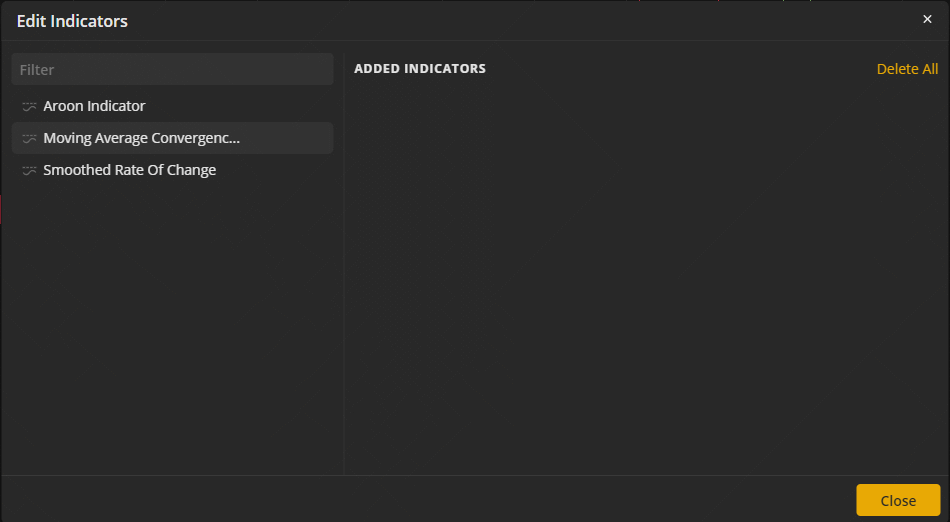
For example, let's say you would like to include only those three studies: Aroon, SROC, and MACD.
import React from 'react';import { DEFAULT_STUDIES_LIST } from '@dx-private/dxchart5-react/dist/config/studies-list';import { fromRawStudiesSettings } from '@dx-private/dxchart5-react/dist/chart/model/studies.model';import { createDxStudiesProvider } from '@dx-private/dxchart5-react/dist/providers/studies/dx-studies-provider';import { ChartReactApp } from '@dx-private/dxchart5-react/dist/chart/chart-react-app';import { CREATE_MOCK_PROVIDERS } from '@dx-private/dxchart5-react-mock-providers/dist';// list of studies you would like to seeconst listOfStudies = ['Aroon', 'SROC', 'MACD'];export const dxStudiesProviderWithCustomList = createDxStudiesProvider(// here in `DEFAULT_STUDIES_LIST` function you can pass your localization for studies as an argumentDEFAULT_STUDIES_LIST().filter(study => listOfStudies.includes(study.id)).map(fromRawStudiesSettings),);export const dxChartsWithCustomStudiesList = () => {const deps = {...CREATE_MOCK_PROVIDERS(),// ...otherDependencies,// wire up your custom dxStudesProviderdxStudiesProvider: dxStudiesProviderWithCustomList,};return <ChartReactApp dependencies={deps} />;};
After that you can see a list of 3 available studies: Aroon, SROC, and MACD
Details about studies
Indicators with Implied Volatility
There are some indicators that require Implied Volatility (IV) data for their calculations.
Implied Volatility indicator.
If the data provider returns impVolatility for candles data, this indicator will plot the IV values. If the data provider sends no such data, this plot will be hidden.
Momentum indicator.
There is an additional option called "Implied Volatility" for price setting if impVolatility data is provided, if not, this option will be hidden.
Custom studies UI
The built-in indicators settings popup is not replaceable via uiOverrides. To use your own UI for adding, removing, and configuring studies:
- Hide the default button:
chartReactConfig.toolbar.buttons.studies.enabled: false - Add a custom toolbar button (Toolbar buttons)
- Drive studies from your UI via the chart API in
onAPICreated:
api.setStudies([{ id: 'MACD', parameters: { /* ... */ } }], chartId);
api.setStudiesByIds(['RSI', 'MACD'], chartId);
api.addCustomStudy(customStudyDefinition, true, chartId);
api.removeCustomStudy('MY_STUDY_ID');
For JavaScript custom studies, define parameters in metainfo.parameters — they appear in the default properties dialog unless you set values only from your host UI.
Built-in study behavior is defined in @dx-private/dxstudies and cannot be changed through chart config.
Custom studies
In addition to the built-in studies, you can create your own with any calculation logic. Custom studies support:
- Multiple configurable parameters
- Multiple output lines with different visualization styles
- Built-in utility functions for common technical analysis calculations
- Real-time updates as new price data arrives
- State management for complex calculations
Read next
- Complete Custom Studies Guide - Learn how to create custom studies
- Quick Reference - API reference and examples
- Utility Functions - Built-in helper functions
- Custom Studies Provider - Persist and share studies