Events Data Provider
EventsDataProvider connects your economic events (such as earnings, dividends, splits, etc.) provider for selected instrument with DXcharts React application.
Here's how they look like on chart:
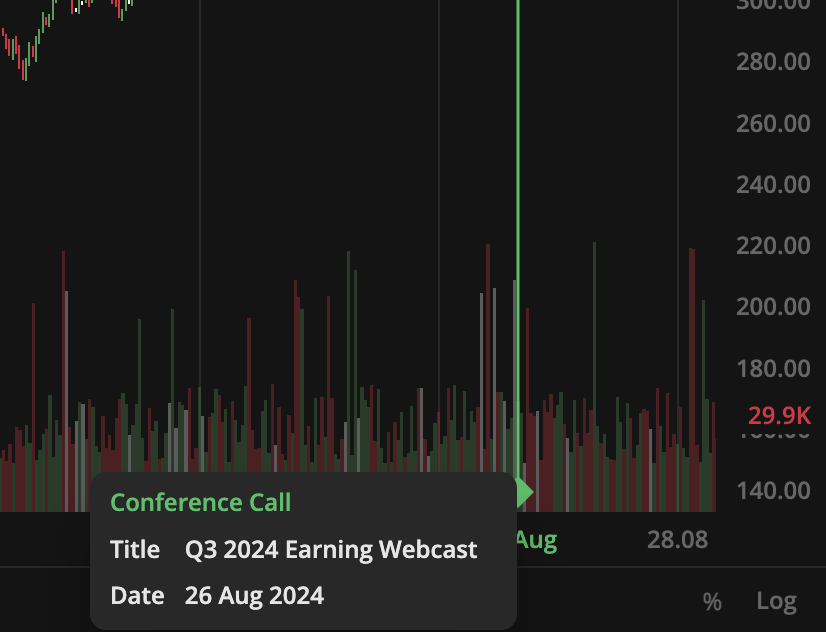
Example
import { mulberry32 } from '@dx-private/dxchart5-react/dist/utils/generator/random';import { addDays, format } from 'date-fns';const random = mulberry32(4596423324);const MOCK_EVENTS = [{kind: 'earnings',basic: parseFloat((random() * 8).toFixed(2)),diluted: parseFloat((random() * 8).toFixed(2)),timestamp: addDays(Date.now(), -1).getTime(),periodEnding: addDays(Date.now(), -1).getTime(),},{kind: 'dividends',gross: `${(random() * 3).toFixed(2)}`,timestamp: addDays(Date.now(), -2).getTime(),},{kind: 'splits',splitFrom: 1,splitTo: 4,timestamp: addDays(Date.now(), -3).getTime(),},{kind: 'conference-calls',referencePeriod: format(addDays(Date.now(), -4).getTime(), 'QQQ yyyy'),eventType: 'Earning',timestamp: addDays(Date.now(), -4).getTime(),},];/*** Creates mock implementation of {@link EventsDataProvider}.*/export const createMockEventDataProvider = () => {const requestEventsData = () => Promise.resolve({ events: MOCK_EVENTS });return {requestEventsData,};};
Real-world example: dxFeed Fundamentals Provider
The following example shows a complete implementation of an Events Data Provider that connects to a dxFeed Fundamentals API. This provider:
- Fetches corporate events (earnings, dividends, splits, conference calls) from dxFeed endpoints
- Fetches data in parallel - requests earnings and corporate actions simultaneously for better performance
- Transforms data from dxFeed format to chart format with proper timestamp conversion
- Deduplicates events - removes events with identical timestamps
- Caches responses to avoid duplicate API calls
import {ConferenceCallEvent,DividendsEvent,EventsData,EventsDataProvider,SplitsEvent,EarningsEvent,Event,} from '@dx-private/dxchart5-react/dist/providers/events-data-provider';/*** NOTE: This example uses RxJS and fp-ts for advanced patterns.** Dependencies required (install in your project):* - rxjs: npm install rxjs* - fp-ts: npm install fp-ts* - date-fns: npm install date-fns* - date-fns-tz: npm install date-fns-tz** If you don't use these libraries, see simple-events-data-provider-example.ts* for a simplified version without these dependencies.*/import { map, startWith } from 'rxjs/operators';import { remoteData, RemoteData } from '@dx-private/dxchart5-react/dist/utils/remote-data';// @ts-ignore - Example code, requires rxjs dependencyimport { from, Observable, lastValueFrom } from 'rxjs';import { sequenceT } from 'fp-ts/Apply';import { parse } from 'date-fns';import { pipe } from 'fp-ts/function';import { array, number } from 'fp-ts';import { contramap } from 'fp-ts/Eq';// @ts-ignore - Example code, requires date-fns-tz dependencyimport { fromZonedTime } from 'date-fns-tz';import { observable } from 'fp-ts-rxjs';/*** Example: Events Data Provider implementation using dxFeed Fundamentals API** This provider fetches corporate events (earnings, dividends, splits, conference calls)* from a dxFeed Fundamentals endpoint. It implements:* - requestEventsData: fetches all events for a given symbol** IMPORTANT FOR YOUR IMPLEMENTATION:* - You don't need to use RemoteData pattern - simple Promise<EventsData> is fine* - You don't need RxJS - the interface only requires Promise* - The key is to return EventsData with events array containing proper event types* - Event types: 'earnings', 'dividends', 'splits', 'conference-calls'* - Each event needs: kind, timestamp, and type-specific fields** SIMPLIFIED VERSION (without RemoteData/RxJS):* ```typescript* export const createSimpleEventsProvider = (apiUrl: string): EventsDataProvider => {* const requestEventsData = async (symbol: string): Promise<EventsData> => {* const response = await fetch(`${apiUrl}/events/${symbol}`);* const data = await response.json();* return {* events: data.events.map(transformToChartEvent)* };* };* return { requestEventsData };* };* ```** The provider includes:* - Parallel fetching of earnings/conference calls and corporate actions (dividends/splits)* - Data transformation from dxFeed format to chart format* - Caching to avoid duplicate requests* - Error handling with RemoteData pattern (optional - you can use try/catch)* - Deduplication of events with same timestamp*/export interface DxFeedEventsDataProviderOptions {readonly endpointUrl: string;readonly username: string;readonly password: string;}// These interfaces represent dxFeed API response format - adapt to your APIinterface DxFeedEarning {eventTime: number;announceType: string;eps: number;estimatedEPS: number;ymd: string; // Date in yyyyMMdd format}interface DxFeedCorporateAction {eventTime: number;type: string;exYmd: string; // Ex-date in yyyyMMdd format}interface DxFeedDividend extends DxFeedCorporateAction {type: 'DIVIDEND';adjustmentValue: number;}interface DxFeedStockSplit extends DxFeedCorporateAction {type: 'STOCK_SPLIT';ext: {splitFrom: number;splitTo: number;};}interface DxFeedConferenceCall extends DxFeedEarning {announceType: 'CONFERENCE_CALL';announceTime: string;ymd: string;referencePeriod: string;eventType: string;}type EarningsAndConfCalls = Readonly<{ earnings: DxFeedEarning[]; confCalls: DxFeedConferenceCall[] }>;type DividendsAndSplits = Readonly<{ dividends: DxFeedDividend[]; splits: DxFeedStockSplit[] }>;const isStockSplit = (action: DxFeedCorporateAction): action is DxFeedStockSplit => action.type === 'STOCK_SPLIT';const isDividend = (action: DxFeedCorporateAction): action is DxFeedDividend => action.type === 'DIVIDEND';const isConferenceCall = (event: DxFeedEarning): event is DxFeedConferenceCall =>event.announceType === 'CONFERENCE_CALL';/*** Fetch dividends and stock splits from corporate actions endpoint** NOTE: This example fetches from two separate endpoints. Your API might:* - Return all events in one endpoint* - Have different endpoint structure* - Use different authentication** Adapt the fetch logic to match your API structure.*/const requestDividendsAndSplits = (url: string,instrument: string,headers: Headers,): Promise<RemoteData<Error, DividendsAndSplits>> => {const queryUrl = `${url}/corporate-action/symbol/${instrument}`;return fetch(queryUrl, { headers }).then<DxFeedCorporateAction[]>(res => res.json()).then(actions => {const dividendsAndSplits = actions.reduce<DividendsAndSplits>((acc, action) => {if (isDividend(action)) {acc.dividends.push(action);}if (isStockSplit(action)) {acc.splits.push(action);}return acc;},{ dividends: [], splits: [] },);return remoteData.success<Error, DividendsAndSplits>(dividendsAndSplits);}).catch(reason => remoteData.failure(new Error(reason)));};/*** Fetch earnings and conference calls from earnings endpoint** NOTE: This is dxFeed-specific. For your API:* - Replace endpoint URL with your API* - Adapt response parsing to your format* - You might get all events in one call instead of two*/const requestEarningsAndConferenceCalls = (url: string,instrument: string,headers: Headers,): Promise<RemoteData<Error, EarningsAndConfCalls>> => {const queryUrl = `${url}/earning/symbol/${instrument}`;return fetch(queryUrl, { headers }).then<DxFeedEarning[]>(res => res.json()).then(events => {const earningsAndConfCalls = events.reduce<EarningsAndConfCalls>((acc, event) => {if (isConferenceCall(event)) {acc.confCalls.push(event);} else {acc.earnings.push(event);}return acc;},{ earnings: [], confCalls: [] },);return remoteData.success<Error, EarningsAndConfCalls>(earningsAndConfCalls);}).catch(reason => remoteData.failure(new Error(reason)));};/*** Main request function that fetches all events in parallel** NOTE: This uses RxJS and RemoteData pattern. You can simplify this:** ```typescript* const requestEventsData = async (symbol: string): Promise<EventsData> => {* try {* // Fetch all events (or fetch separately and combine)* const [earnings, corporateActions] = await Promise.all([* fetch(`${apiUrl}/earnings/${symbol}`).then(r => r.json()),* fetch(`${apiUrl}/corporate-actions/${symbol}`).then(r => r.json())* ]);** // Transform and combine* const events = [* ...earnings.map(toChartEarning),* ...corporateActions.dividends.map(toChartDividends),* ...corporateActions.splits.map(toChartSplits)* ];** return { events };* } catch (error) {* console.error('Failed to fetch events:', error);* return { events: [] }; // Return empty on error* }* };* ```*/export const requestDxFeedEvents = (options: DxFeedEventsDataProviderOptions,instrument: string,): Observable<RemoteData<Error, EventsData>> => {const headers = new Headers();headers.set('Authorization', `Basic ${btoa(`${options.username}:${options.password}`)}`);return from(Promise.all([requestEarningsAndConferenceCalls(options.endpointUrl, instrument, headers),requestDividendsAndSplits(options.endpointUrl, instrument, headers),]),).pipe(map(([earningsAndConfCalls, dividendsAndSplits]) =>pipe(sequenceT(remoteData.remoteData)(earningsAndConfCalls, dividendsAndSplits),remoteData.map<[EarningsAndConfCalls, DividendsAndSplits], EventsData>(([{ earnings, confCalls }, { dividends, splits }]) => {const chartEarnings = removeSameTimestamps(earnings.map(toChartEarning));const chartDividends = removeSameTimestamps(dividends.map(toChartDividends));const chartSplits = removeSameTimestamps(splits.map(toChartSplits));const chartConfCalls = removeSameTimestamps(confCalls.map(toChartConfCall));return { events: [...chartDividends, ...chartEarnings, ...chartSplits, ...chartConfCalls] };},),),),startWith(remoteData.pending),);};/*** Creates an Events Data Provider that connects to dxFeed Fundamentals API** ADAPTATION GUIDE FOR YOUR API:** 1. Replace fetch URLs with your API endpoints* 2. Remove RemoteData/RxJS if you don't use them - just use Promise* 3. Map your API response to EventsData format:* {* events: [* { kind: 'earnings', timestamp: number, basic?: number, diluted?: number, periodEnding?: number },* { kind: 'dividends', timestamp: number, gross: string },* { kind: 'splits', timestamp: number, splitFrom: number, splitTo: number },* { kind: 'conference-calls', timestamp: number, referencePeriod?: string, eventType?: string }* ]* }* 4. Timestamp must be in milliseconds (Date.getTime() format)* 5. Caching is recommended but optional** @param options - Configuration with endpoint URL and authentication credentials* @returns EventsDataProvider instance with caching*/export const createDxFeedEventsDataProvider = (options: DxFeedEventsDataProviderOptions): EventsDataProvider => {const cache: Record<string, Promise<EventsData>> = {};/*** requestEventsData: Called when chart needs events for a symbol** Requirements:* - Return Promise<EventsData> with events array* - Return { events: [] } if symbol is empty or on error* - Caching is recommended to avoid duplicate API calls* - Events should be sorted by timestamp (optional but recommended)*/const requestEventsData = (symbol: string): Promise<EventsData> => {if (symbol === '') {return Promise.resolve({ events: [] });}if (cache[symbol] !== undefined) {return cache[symbol];}const eventsPromise = lastValueFrom(requestDxFeedEvents(options, symbol).pipe(observable.map(data => (remoteData.isSuccess(data) ? data.value : { events: [] })),),);cache[symbol] = eventsPromise;return eventsPromise;};return { requestEventsData };};/*** Transform dxFeed date format (yyyyMMdd) to timestamp in milliseconds** IMPORTANT: Chart expects timestamps in milliseconds (Date.getTime() format).* If your API returns dates in different formats, adapt this function:* - ISO string: new Date(dateString).getTime()* - Unix timestamp (seconds): timestamp * 1000* - Date object: date.getTime()*/const parseYMD = (ymd: string) => fromZonedTime(parse(ymd, 'yyyyMMdd', new Date()), 'UTC').getTime();/*** Transform dxFeed earnings to chart format** Required fields:* - kind: 'earnings'* - timestamp: number (milliseconds)** Optional fields:* - basic: estimated EPS* - diluted: actual EPS* - periodEnding: period end timestamp*/const toChartEarning = (e: DxFeedEarning): EarningsEvent => ({kind: 'earnings' as const,basic: e.estimatedEPS,diluted: e.eps,timestamp: parseYMD(e.ymd),periodEnding: parseYMD(e.ymd),});/*** Transform dxFeed dividends to chart format** Required fields:* - kind: 'dividends'* - timestamp: number (milliseconds)* - gross: string (dividend amount)*/const toChartDividends = (e: DxFeedDividend): DividendsEvent => ({kind: 'dividends' as const,gross: `${e.adjustmentValue}`,timestamp: parseYMD(e.exYmd),});/*** Transform dxFeed stock splits to chart format** Required fields:* - kind: 'splits'* - timestamp: number (milliseconds)* - splitFrom: number (e.g., 1)* - splitTo: number (e.g., 4 for 4:1 split)*/const toChartSplits = (e: DxFeedStockSplit): SplitsEvent => ({kind: 'splits' as const,splitFrom: e.ext.splitFrom,splitTo: e.ext.splitTo,timestamp: parseYMD(e.exYmd),});/*** Transform dxFeed conference calls to chart format** Required fields:* - kind: 'conference-calls'* - timestamp: number (milliseconds)** Optional fields:* - referencePeriod: string* - eventType: string*/const toChartConfCall = (e: DxFeedConferenceCall): ConferenceCallEvent => ({kind: 'conference-calls' as const,timestamp: parseYMD(e.ymd),referencePeriod: e.referencePeriod,eventType: e.eventType || e.announceTime,});/*** Remove duplicate events with same timestamp** This is optional but recommended - prevents duplicate markers on chart* if your API returns duplicate events.*/const removeSameTimestamps = (events: Event[]) =>pipe(events, array.uniq(contramap((event: Event) => event.timestamp)(number.Eq)));
Key features
- Parallel fetching: Uses
Promise.allto fetch earnings and corporate actions simultaneously - RemoteData pattern: Uses RemoteData type for proper error handling
- Date transformation: Converts dxFeed date format (yyyyMMdd) to timestamps
- Event deduplication: Removes duplicate events using timestamp equality
- Response caching: Caches promises per symbol to avoid duplicate requests
API reference
EventsDataProvider
Fetches fundamental economic events
- EventsDataProvider.requestEventsData
- Parameters
- symbol: string
- - symbol to get {@link EventsData} for
- Returns
- Promise<EventsData>
EventsDataProvider.requestEventsData(symbol: string): Promise<EventsData>
Returns events data for a symbol