News Data Provider
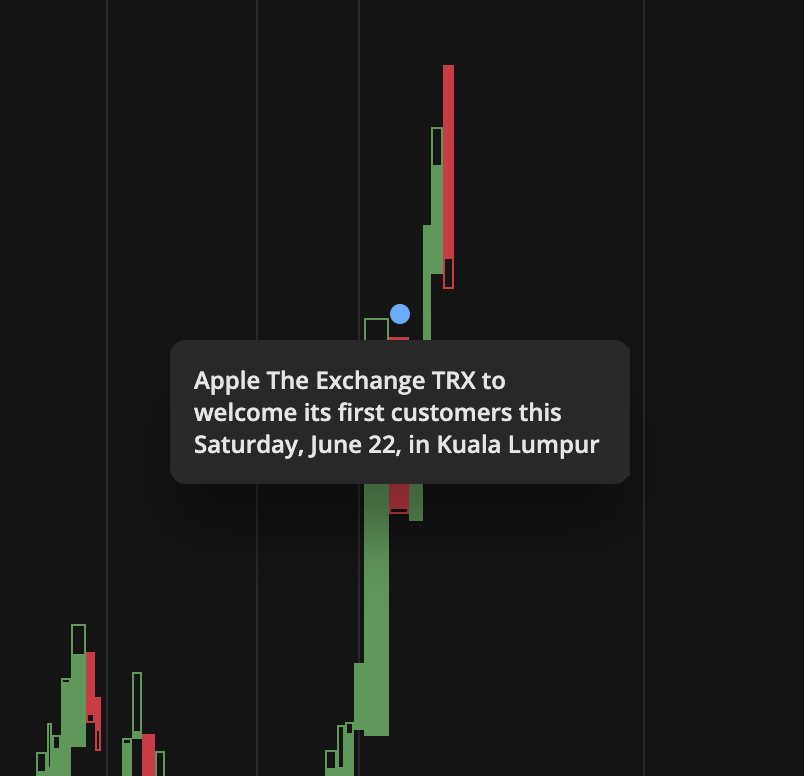
NewsDataProvider connects your news regarding selected instrument with DXcharts React application.
Here's how they look like on chart:
How it works
import { addDays } from 'date-fns';import { News, NewsDataProvider } from '@dx-private/dxchart5-react/dist/providers/news-data-provider';const MOCK_NEWS_DATA: News[] = [{title: 'News 1',timestamp: addDays(Date.now(), -5).getTime(),sourceLink: 'https://google.com',},{title: 'News 2',timestamp: addDays(Date.now(), -6).getTime(),sourceLink: 'https://google.com',},{title: 'News 3',timestamp: addDays(Date.now(), -10).getTime(),sourceLink: 'https://google.com',},];/*** Creates mock implementation of {@link NewsDataProvider}.*/export const createMockNewsDataProvider = (): NewsDataProvider => ({requestNews() {return Promise.resolve({news: MOCK_NEWS_DATA,});},});
Real-world example: dxFeed News Provider
The following example shows a complete implementation of a News Data Provider that connects to a dxFeed News API. This provider:
- Fetches news articles related to instruments from a dxFeed News endpoint
- Extracts URLs from news items - either from the
urlfield or by parsing HTML body content - Caches responses to avoid duplicate API calls
- Handles errors gracefully with try-catch and console warnings
:::tip Adapting to your API
This example is straightforward to adapt:
- Replace fetch URL with your API endpoint
- Adapt authentication to your method (Bearer token, API key, etc.)
- Map your API response to
NewsDataformat:{news: [{title: string, // Required: news headlinetimestamp: number, // Required: milliseconds (Date.getTime())sourceLink?: string // Optional: URL to full article}]} - Handle timestamp conversion - ensure it's in milliseconds
- Simplify URL extraction if your API always provides URLs
See comments in the code for detailed adaptation instructions.
:::
import { NewsData, NewsDataProvider } from '@dx-private/dxchart5-react/dist/providers/news-data-provider';/*** Example: News Data Provider implementation using dxFeed News API** This provider fetches news articles related to instruments from a dxFeed News endpoint.* It implements:* - requestNews: fetches news for a given symbol** IMPORTANT FOR YOUR IMPLEMENTATION:* - Your API should return news items with: title, timestamp, and optionally sourceLink* - Timestamp must be in milliseconds (Date.getTime() format)* - Caching is recommended to avoid duplicate API calls* - Error handling should return empty array, not throw** The provider includes:* - Basic authentication via Authorization header* - Response caching to avoid duplicate requests* - HTML parsing to extract news article URLs from body content* - Error handling with graceful fallback*/interface DxFeedEventsNewsProviderOptions {newsURL: string;username: string;password: string;}// This interface represents dxFeed API response - adapt to your API formatinterface DXFeedNewsData {title: string;time: number; // Timestamp in milliseconds or Unix secondsbody: string; // HTML or plain text contenturl?: string; // Optional direct URL to article}/*** Creates a News Data Provider that connects to dxFeed News API** ADAPTATION GUIDE FOR YOUR API:** 1. Replace fetch URL with your API endpoint* 2. Adapt authentication to your method (Bearer token, API key, etc.)* 3. Map your API response to NewsData format:* {* news: [* {* title: string, // Required: news headline* timestamp: number, // Required: milliseconds (Date.getTime())* sourceLink?: string // Optional: URL to full article* }* ]* }* 4. If your API returns timestamp in seconds, multiply by 1000* 5. If your API returns ISO date string, use: new Date(dateString).getTime()** @param options - Configuration with news URL and authentication credentials* @returns NewsDataProvider instance with caching*/export const createDxFeedNewsDataProvider = (options: DxFeedEventsNewsProviderOptions): NewsDataProvider => {// Cache promises to avoid duplicate requests for the same symbolconst cachedNews: Record<string, Promise<NewsData>> = {};/*** requestNews: Called when chart needs news for a symbol** Requirements:* - Return Promise<NewsData> with news array* - Return { news: [] } if symbol is empty or on error* - Caching is recommended to avoid duplicate API calls* - News should be sorted by timestamp (newest first is recommended)*/const requestNews = (symbol: string): Promise<NewsData> => {const cachedNewsData = cachedNews[symbol];if (cachedNewsData) {return cachedNewsData;} else {cachedNews[symbol] = fetchNews(options, symbol);return cachedNews[symbol];}};/*** Fetch news from API** NOTE: This example uses Basic Auth. Adapt to your authentication method:* - Bearer token: headers: { 'Authorization': `Bearer ${token}` }* - API key: headers: { 'X-API-Key': apiKey }* - Custom header: headers: { 'X-Custom-Auth': value }*/const fetchNews = async (options: DxFeedEventsNewsProviderOptions, symbol: string): Promise<NewsData> => {const url = `${options.newsURL}?symbol=${symbol}`;const headers = {Authorization: `Basic ${btoa(`${options.username}:${options.password}`)}`,};try {const res = await fetch(url, { headers });// Check if response is OKif (!res.ok) {console.warn(`Failed to fetch news for ${symbol}: ${res.status}`);return { news: [] };}const data = await res.json();const news: DXFeedNewsData[] = await data.news;// Transform to chart formatreturn await Promise.resolve(parseNews(news));} catch (err) {// IMPORTANT: Don't throw - return empty array instead// The chart will work fine without news, but throwing will break itconsole.warn(`Error fetching news for ${symbol}:`, err);return { news: [] };}};/*** Extract URL from news item** This tries to get URL from:* 1. Direct url field (if your API provides it)* 2. First link in HTML body (if body contains HTML)** If your API always provides url field, you can simplify this:* ```typescript* const parseNewsUrl = (news: DXFeedNewsData): string => {* return news.url || '';* };* ```*/const parseNewsUrl = (news: DXFeedNewsData, parser: DOMParser): string => {if (news.url) {return news.url;}// Try to extract URL from HTML body content// Only needed if your API doesn't provide direct URLsconst links = parser.parseFromString(news.body, 'text/html').querySelectorAll('a');return links.item(0)?.href ?? '';};/*** Transform dxFeed news format to chart format** IMPORTANT: timestamp must be in milliseconds* - If your API returns Unix timestamp (seconds): timestamp * 1000* - If your API returns ISO string: new Date(timestamp).getTime()* - If your API returns Date object: timestamp.getTime()*/const parseNews = (newsData: DXFeedNewsData[]): NewsData => {const domParser = new DOMParser();return {news: newsData.map(n => ({title: n.title,// Ensure timestamp is in millisecondstimestamp: typeof n.time === 'number' && n.time < 10000000000? n.time * 1000 // Convert seconds to milliseconds: new Date(n.time).getTime(), // Parse date string/objectsourceLink: parseNewsUrl(n, domParser),})),};};return { requestNews };};
Key features
- Authentication: Uses Basic Auth with username/password (adapt to your method)
- URL extraction: Parses HTML body to extract article links if URL field is missing (simplify if your API always provides URLs)
- Response caching: Caches promises per symbol to avoid duplicate requests (recommended)
- Error handling: Gracefully handles fetch errors - returns empty array instead of throwing (important!)
API reference
NewsDataProvider
Fetches news related to the instrument
- NewsDataProvider.requestNews
- Parameters
- symbol: string
- options: AtLeastOne<RequestNewsOptions>
- symbol: string
- Returns
- Promise<NewsData>
NewsDataProvider.requestNews(symbol: string, options: AtLeastOne<RequestNewsOptions>): Promise<NewsData>